For researchers
Connect every interview, source and note in your research
Transcribe your fieldwork interviews with every voice separated, bring your PDFs and readings into the same notebook and link it all with wikilinks. The graph shows how your evidence connects, so patterns surface instead of hiding in folders.
Free to start · No card · Windows, macOS and Linux

How it works
Transcribe the fieldwork
Upload your interviews, up to 10 hours each, and get every voice separated with the minute of each turn.
Bring in your sources
Import PDFs, even scanned ones, plus Word and EPUB files, and work with them as text next to your interviews.
Link it in the graph
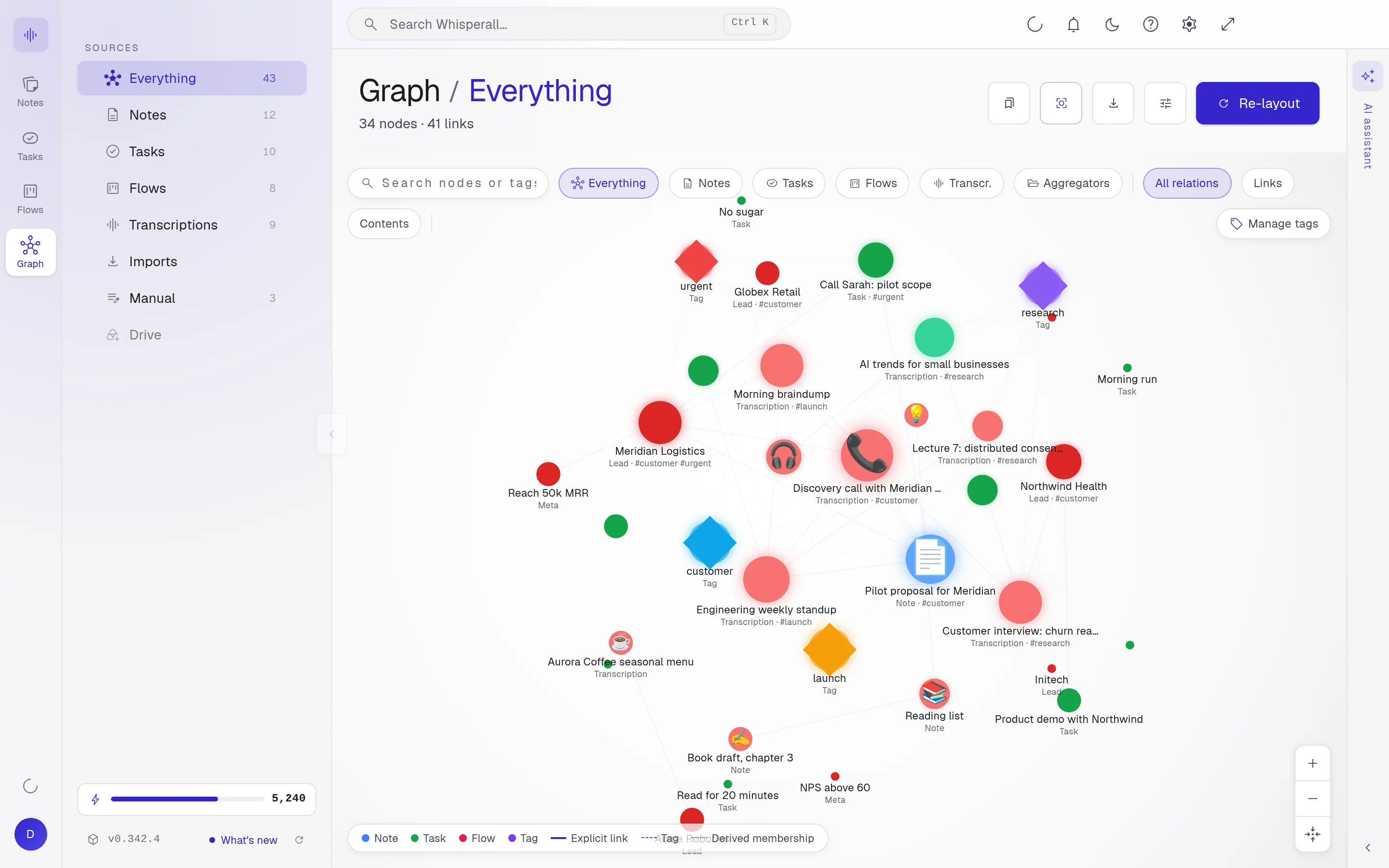
Connect notes with wikilinks and see in the graph how each interview relates to your sources.
Where the thread gets lost
The evidence is rarely missing. What’s missing is having it together.
- Interviews waiting in audio for a transcription that never comes
- Scanned PDFs you can’t search or cite
- Sources in a language you read slowly
- The interview, the paper and your note, each on its own
Interviews ready to quote
Speaker separation is on by default, so you can tell the interviewer from each participant. Give each voice a name or a pseudonym, and when you copy a passage it pastes with its speaker and time.
- Audio or video up to 10 hours and 5 GB per file
- Batches of up to 500 interviews, each in its own note
- English, Spanish, Portuguese, French, German, Italian, Japanese, Korean and Chinese
Your evidence, connected
Link one note to another with [[ ]] wikilinks, just like in Obsidian. The graph draws those connections and lets you save views, so you can see what relates to what.
If you already work in an Obsidian folder, connect it: Whisperall understands its wikilinks and saves your changes to your files.

Read and write across languages
Select a paragraph in any app and translate it with Alt+T, in 12 languages. The screen lens translates what you see, and read aloud reads an article to you while you take notes.
How researchers use it
A few concrete ideas for your fieldwork.
- Transcribe a set of fieldwork interviews
- Translate a passage from a source before citing it
- Link related notes with wikilinks
- See in the graph how interviews and sources connect
- Search for a theme that repeats across your transcripts
- Ask the assistant to find the notes in your notebook on a topic
- Ask your AI about an interview without leaving your note, then write the analysis yourself
Frequently asked questions
Usually yes, and your IRB or institution will tell you how to document it. Whisperall doesn’t notify anyone when you record or ask for that consent for you.
Yes. Copy the transcript and paste it into Word: each turn pastes with its speaker and time. Your notes also export to Word, PDF, Markdown or plain text.
To transcribe them, the audio is sent to the cloud, and the files you upload are kept with their note so you can play them back. Your notes live in your account. There is no end-to-end encryption, so check whether your data protocol allows it.
Transcribing files uses credits based on the length of the audio. The free plan gives you 150 credits once to try it, and paid plans run from $9 to $49 a month. Your notes, links and graph are always free.
Yes. Connect the folder and Whisperall opens your notes with their wikilinks, shows you the graph and saves your changes to your files.
Simple enough for anyone. Powerful enough for you.
Download Whisperall free and keep your notebook forever. AI is paid with credits, only when you use it.
Windows · macOS · Linux · Android and iOS on the way

 Your AI work notebook