For lawyers
Draft the brief while the case is still fresh in your head
Dictate the argument between meetings and it lands as clean text in whatever document you have open. Upload a hearing or deposition recording and get it back with every speaker separated and the minute each one starts talking.
Free to start · No card · Windows, macOS and Linux
How it works
Dictate the argument
Press Alt+X and speak the brief or the case note. There is no minute cap, and the text appears without filler words wherever your cursor is.
Transcribe the hearing
Upload the recording, or a batch of up to 500 files, and every speaker comes back separated with the minute they start talking.
Keep it in the case file
Each transcript becomes a note in the case folder. Select a passage, ask the AI to improve or summarize it, and accept or discard the change.
The part of law that eats your hours
What takes the most time is rarely thinking through the case. It’s turning what was said into text.
- The brief you already worked out loud, typed again from scratch
- Hearing and deposition recordings that wait weeks for someone to transcribe them
- Case details that stay in your head between appointments and never reach the file
Dictate where you draft
Dictate in Word, in your email or in your practice management software, and the text appears at your cursor. The AI cleanup removes filler words and respects your corrections: say “Monday, sorry, Tuesday” and it writes only “Tuesday”.
- A personal dictionary for party names, courts and the terms you use
- If the internet drops, the audio stays on your computer and you transcribe it again
Hearings and depositions, with who said what
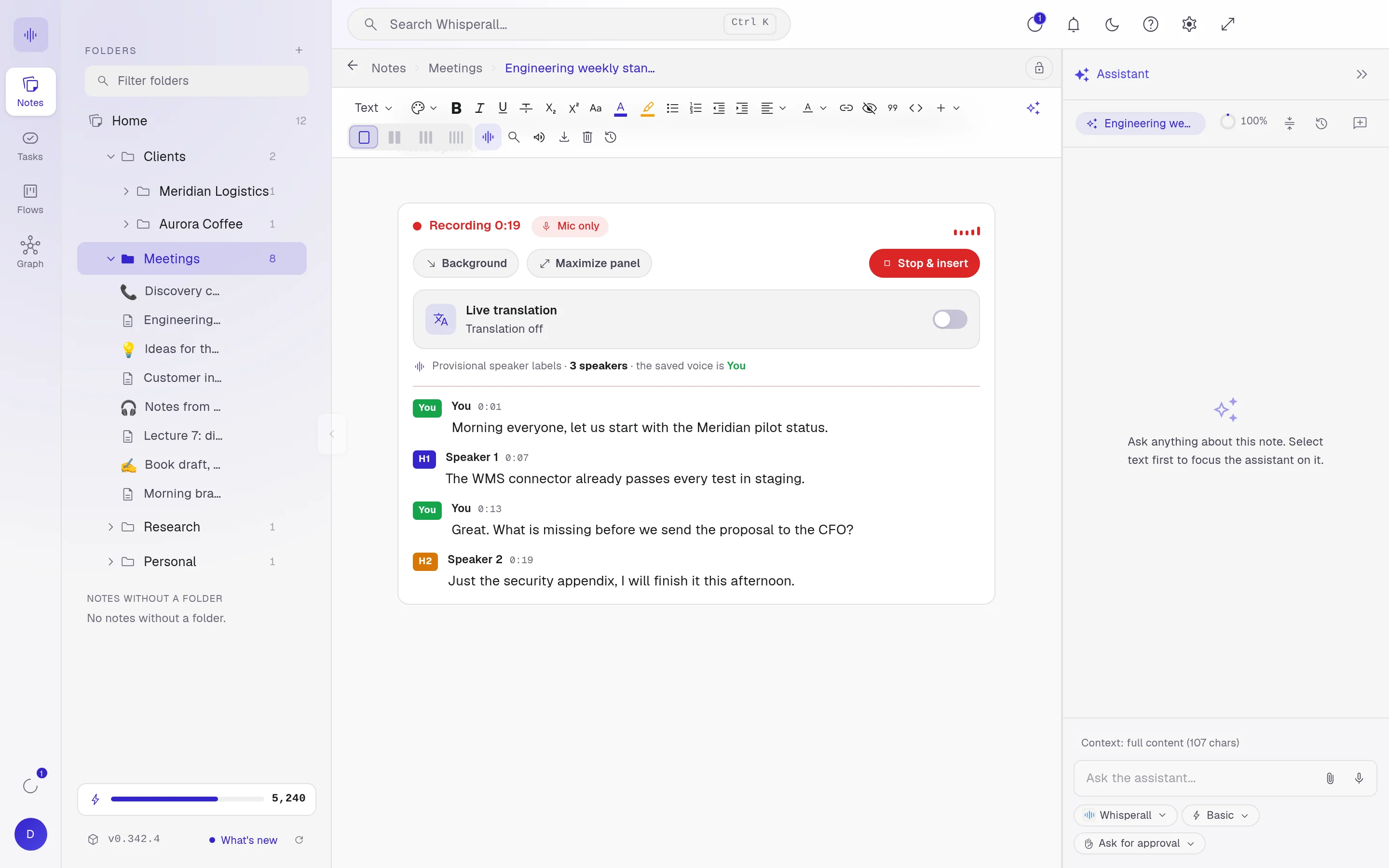
Upload audio or video up to 10 hours and 5 GB per file. Speaker separation is on by default: every turn shows its speaker and the minute it starts, and when you name a voice, all of its turns update.
A play button on each turn replays the audio from that point, and when you copy a passage it pastes with its speaker and time.
- Batches of up to 500 files, each in its own note inside the folder you choose
- English, Spanish, Portuguese, French, German, Italian, Japanese, Korean and Chinese

The case file, at hand
The transcript, your notes and the case documents live in the same folder, and you link them to their tasks.
- Import briefs in Word or PDF and work on them next to the transcript
- Search a phrase across all your notes with Ctrl+K
- Version history to see what changed and restore an earlier version
- Export to Word, PDF, Markdown or plain text
How lawyers use it
A few concrete ways to start this week.
- Dictate the first draft of a brief between two meetings
- Transcribe a full hearing and read each speaker in order
- Turn a deposition recording into a searchable case note
- Record a client call and ask the assistant to turn the action items into tasks
- Keep every case in its own folder, with its notes and tasks linked
- Ask your AI to put the facts of a deposition in order and review each change before accepting it
Frequently asked questions
Whisperall records what plays on your computer and your microphone, without adding a bot to the call, so nobody gets an automatic notice. Letting people know and getting consent when the law, the court or your client requires it is up to you.
Up to 10 hours and 5 GB per file, audio or video. If you record live from your computer there is no length cap, only your credit balance.
To transcribe it, the audio is sent to the cloud. Dictation audio isn’t kept on our servers, but the files you upload are, with their note, so you can play them back. Your dictations and meetings also stay on your computer, for a week by default. There is no end-to-end encryption, so decide what to upload based on your firm’s confidentiality rules.
Add party names, courts and the terms you use most to your personal dictionary so dictation spells them right.
Notes, folders and tasks are free. AI uses credits: the free plan includes 150 once, and the $9 Starter plan includes 2,000 a month, about 11 hours of dictation or 3.7 hours of video calls. Transcribing files spends credits from the same balance, based on the length of the audio.
Simple enough for anyone. Powerful enough for you.
Download Whisperall free and keep your notebook forever. AI is paid with credits, only when you use it.
Windows · macOS · Linux · Android and iOS on the way

 Your AI work notebook