For journalists
Every interview transcribed, every voice on the record
Upload hours of interviews and get them back as text, with every voice separated and the minute each turn starts. Find the quote, replay it and write the story in the same place.
Free to start · No card · Windows, macOS and Linux

How it works
Upload the interviews
Audio or video from your recorder, your phone or a video call, up to 10 hours per file, or batches of up to 500.
Separate the speakers
Every voice comes back separated with the minute it starts talking. Name a speaker once and it updates across the whole interview.
Write right there
Find the quote, copy it with its speaker and time, and draft the story in the same notebook, by voice or by keyboard.
What stands between you and the story
You already did the interview. What’s missing is turning it into text you can use.
- Hours of tape nobody has time to type up
- Hunting the exact quote in a two-hour recording
- On a panel or a group interview, the voices blur together in your notes
Transcribe without typing
Whisperall transcribes mp3, m4a, wav, mp4, voice messages and other common formats. A batch of up to 500 files runs by itself, one after another, and each interview lands in its own note.
- Paste the link to a press conference and its audio is transcribed, up to 10 hours
- English, Spanish, Portuguese, French, German, Italian, Japanese, Korean and Chinese
Every quote with its minute
Speaker separation is on by default. Every turn shows its speaker and the minute it starts, and one click replays the audio from there so you can check the quote.
- Copy a passage and it pastes with its speaker and time
- Search a phrase across all your interviews with Ctrl+K
- Download the note’s audio as MP3

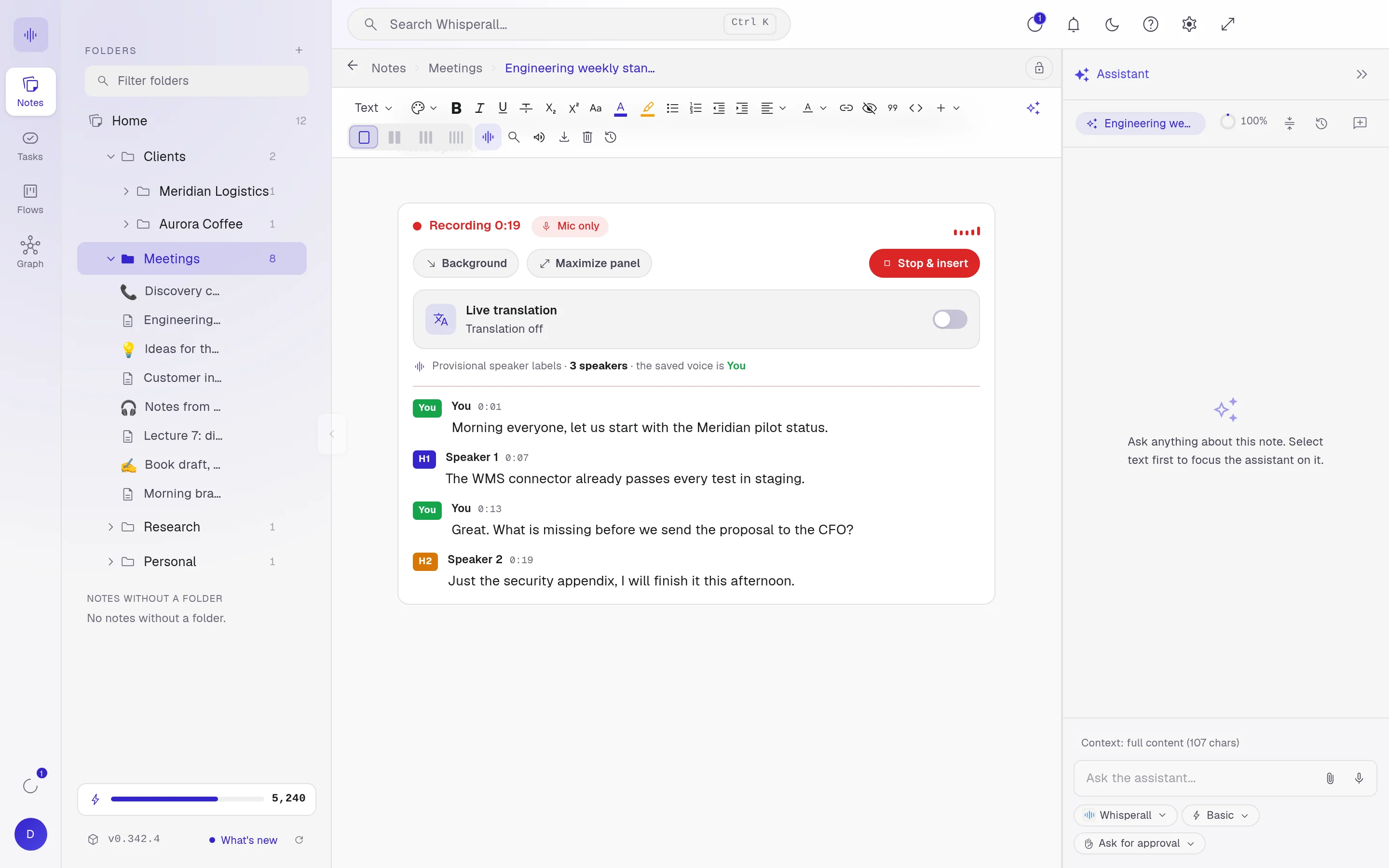
From tape to draft
Dictate the draft and the AI cleanup removes filler words. Then select a paragraph and ask for it to be improved or summarized, and accept or discard each change. Export to Word, PDF, Markdown or plain text.
How reporters use it
A few concrete ideas for your next story.
- Transcribe a full round of interviews in a single batch
- Attribute every quote to the right person
- Search a two-hour interview for one line
- Transcribe a press conference from its link
- Transcribe the voice messages your sources send you
- Keep each story in its own folder of transcripts
- Ask your AI where a topic came up, then write the final story yourself
Frequently asked questions
The rules change by country and newsroom. Whisperall doesn’t notify anyone when you record, so getting your source’s consent is up to you.
Up to 10 hours and 5 GB per file. If you record it live from your computer there is no length cap, only your credit balance.
Yes. Paste the link to a video on YouTube or another site and Whisperall downloads the audio on your computer and transcribes it, up to 10 hours. For a livestream, record it while it plays on your computer.
To transcribe it, the audio is sent to the cloud, and the files and links you transcribe are kept with their note so you can play them back. Your notes live in your account. There is no end-to-end encryption, so weigh what you upload when a source asks for confidentiality.
Transcribing files uses credits based on the length of the audio. The free plan gives you 150 credits once to try it, and paid plans run from $9 to $49 a month, with 2,000 to 13,000 credits.
Simple enough for anyone. Powerful enough for you.
Download Whisperall free and keep your notebook forever. AI is paid with credits, only when you use it.
Windows · macOS · Linux · Android and iOS on the way

 Your AI work notebook