Meetings
Record the meeting and every voice lands in its place
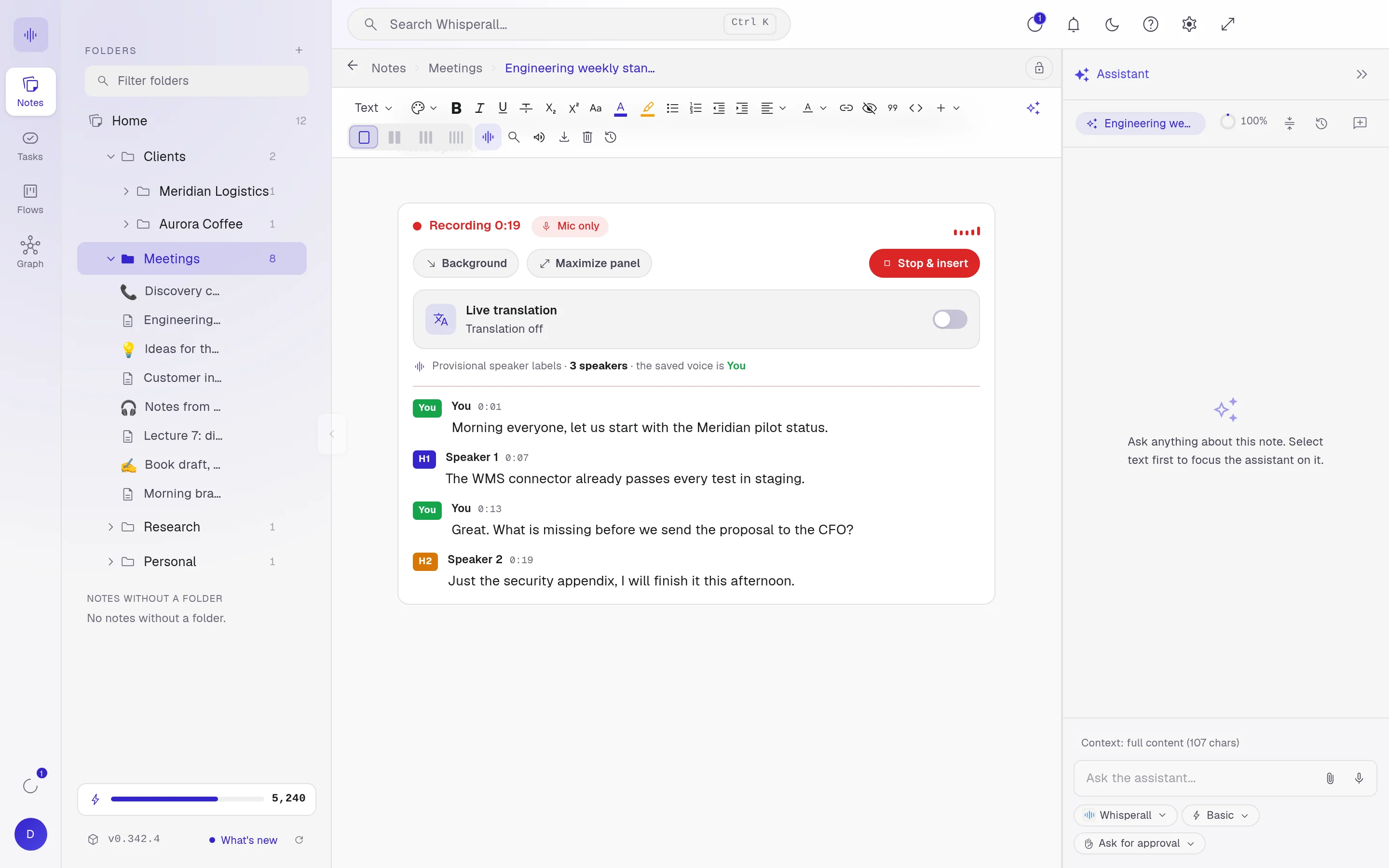
Whisperall transcribes the meeting live inside your note, separates speakers by their voice and never adds a bot to the call. When it ends, the assistant helps you pull out the decisions and tasks.
Free to start · No card · Windows, macOS and Linux
How it works
Pick the mode
Virtual records your computer audio and your microphone. In person records only the microphone.
Talk as usual
The transcript flows into your note as people speak. Each voice shows as Speaker 1, 2, 3. Name each one and mark which one is you.
Pull out the to-dos
Stop and insert the transcript, then ask the assistant for the summary and the tasks.
Separated by voice, not by source
It tells people apart by their voice in real time, even when they share one microphone.
The AI does not guess names. Rename a speaker once and all of their turns update.

No bots on your call
It records what plays on your screen: video calls, livestreams, webinars or online classes. Nobody gets an extra invite.
- Live translation while people talk
- No length cap
- Keeps recording in the background while you work in another note
Your audio stays with you
Audio is saved on your computer from the first second. If something fails, you transcribe it again from Activity.
Frequently asked questions
No. Whisperall records your computer audio and microphone without joining the call. Telling participants when required is up to you.
Yes. Recording system audio in a virtual meeting needs macOS 15 or later.
The $9 a month plan gives you 2,000 credits, roughly 3.7 hours of video calls. The free plan gives you 150 credits once to try it.
Your notes, your files, the AI you choose. You decide.
Download Whisperall free. Your notes are free forever and AI is paid with credits, only when you use it.
Windows · macOS · Linux · Android and iOS on the way

 Your AI, inside your notes