Windows
AI notes and voice dictation for Windows
Install Whisperall on Windows 10 or 11 to dictate into any program, record your meetings with the computer’s audio and ask the AI to work on your notes. It installs in a minute and keeps itself up to date.
v0.353.0 · 695 MB · Free plan included. No card required.

 9:41
9:41Install it in three steps
Download the installer
Get the 64-bit .exe from this page. The same installer keeps itself up to date afterwards.
Open it
Double-click it. It installs for your user with no questions and opens Whisperall when it finishes.
Sign in and dictate
Create your account or sign in with the one you have. Hold Right Ctrl in any app and speak.
Dictate into any Windows program
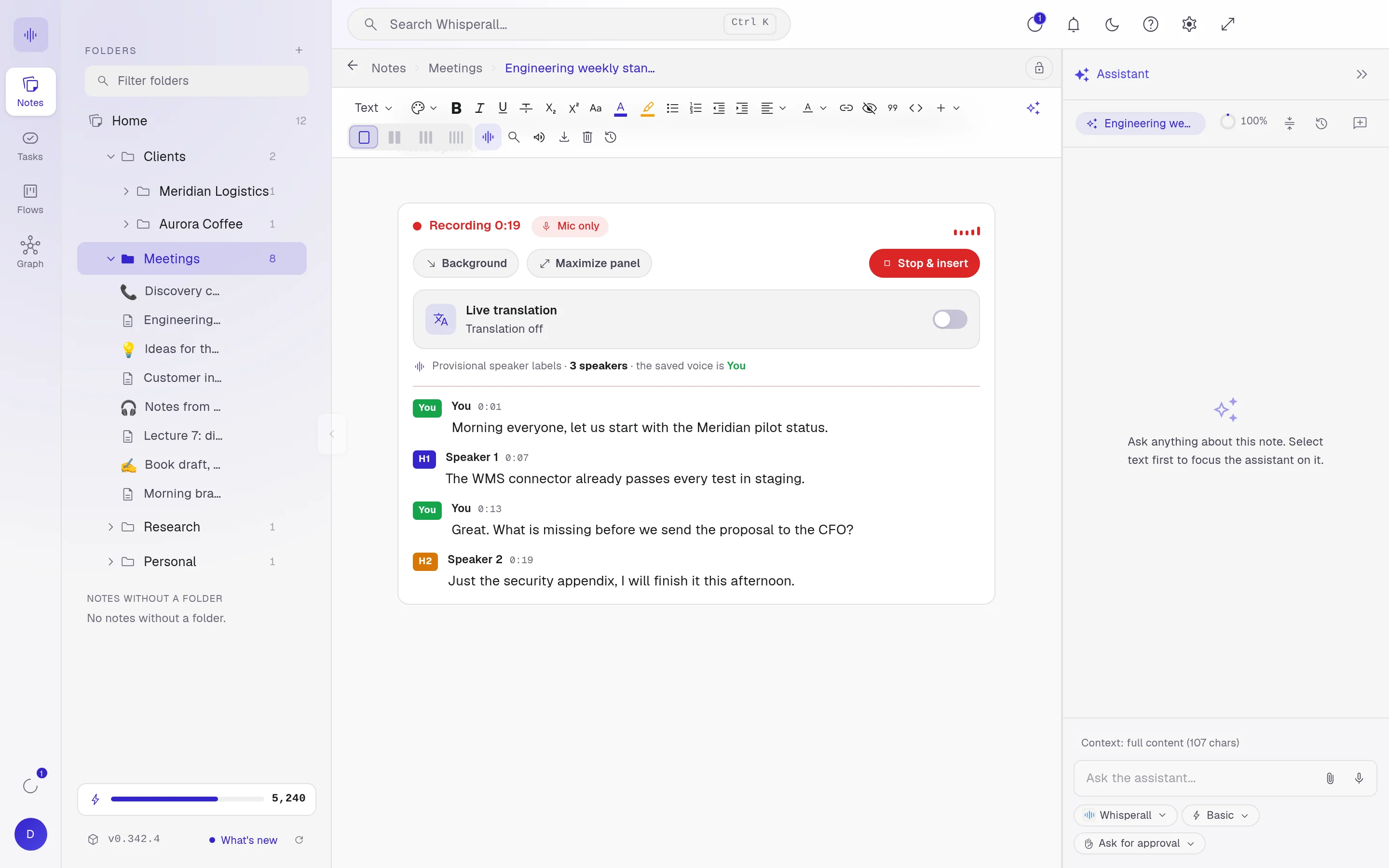
Hold Right Ctrl, speak and let go. The clean text lands where your cursor is, in Word, Outlook, the browser or your chat, with no minute cap per dictation.
- Change the key, or tap once to start and once to stop
- Alt+T translates what you dictate
- Ctrl+Shift+R reads what you copied out loud
- Alt+W shows or hides the widget
Record meetings with your computer’s audio
In Virtual mode, Whisperall records your microphone and whatever plays on the computer, so Zoom, Meet or Teams come in without a bot joining the call. The transcript lands in your note while people talk.
Your folders and documents, as they are
Connect a folder or your Obsidian vault and edit the files where they live. Open md, txt, docx, odt, epub and pdf without converting them.
What you need
Whisperall runs on any modern Windows PC.
- Windows 10 or 11, 64-bit (x64)
- A microphone
- An internet connection
Frequently asked questions
Yes. It runs on 64-bit Windows 10 and Windows 11. There is no build for 32-bit Windows or for PCs with an ARM processor.
Yes. The installer does not carry a publisher’s digital signature yet, so SmartScreen may warn you. Choose More info and then Run anyway. In Edge, open your downloads and choose Keep.
On its own. Whisperall fetches each new version by itself, so you never download the installer again.
Yes. In Settings you can pick another key or combination and choose whether you hold it or tap once to start and once to stop.
The free plan gives you 150 credits once to try the AI, no card needed. The $9 Starter plan includes 2,000 credits a month.
Simple enough for anyone. Powerful enough for you.
Download Whisperall free and keep your notebook forever. AI is paid with credits, only when you use it.
Windows · macOS · Linux · Android and iOS on the way

 Your AI work notebook