For students
Turn every lecture into notes you can actually study
Record the lecture live or upload the one you recorded on your phone, and Whisperall turns it into text in your notebook. Then ask it to explain what wasn’t clear, dictate your papers and review by listening to your notes.
Free to start · No card · Windows, macOS and Linux

How it works
Record or upload the lecture
In the classroom, record with your computer’s microphone. In an online class, also record the computer’s audio. Or upload the recordings you already have.
Study with the AI
Select part of the lecture and ask it to summarize or explain it. The result arrives as a suggestion you accept or discard.
Review by ear
Listen to your notes read aloud at the speed you want, from 0.75x to 3x.
What makes studying slow
Taking notes and studying compete for the same hours.
- The lecture moves faster than your notes
- Recordings you never replay because they take hours
- The blank page of the essay, with the ideas still in your head
- Readings in a language you read slowly
A whole term in one pass
Upload a batch of up to 500 recordings and they’re transcribed one after another, each in its own note inside the course folder. It takes mp3, m4a, wav, mp4 and other common formats, up to 10 hours per file.
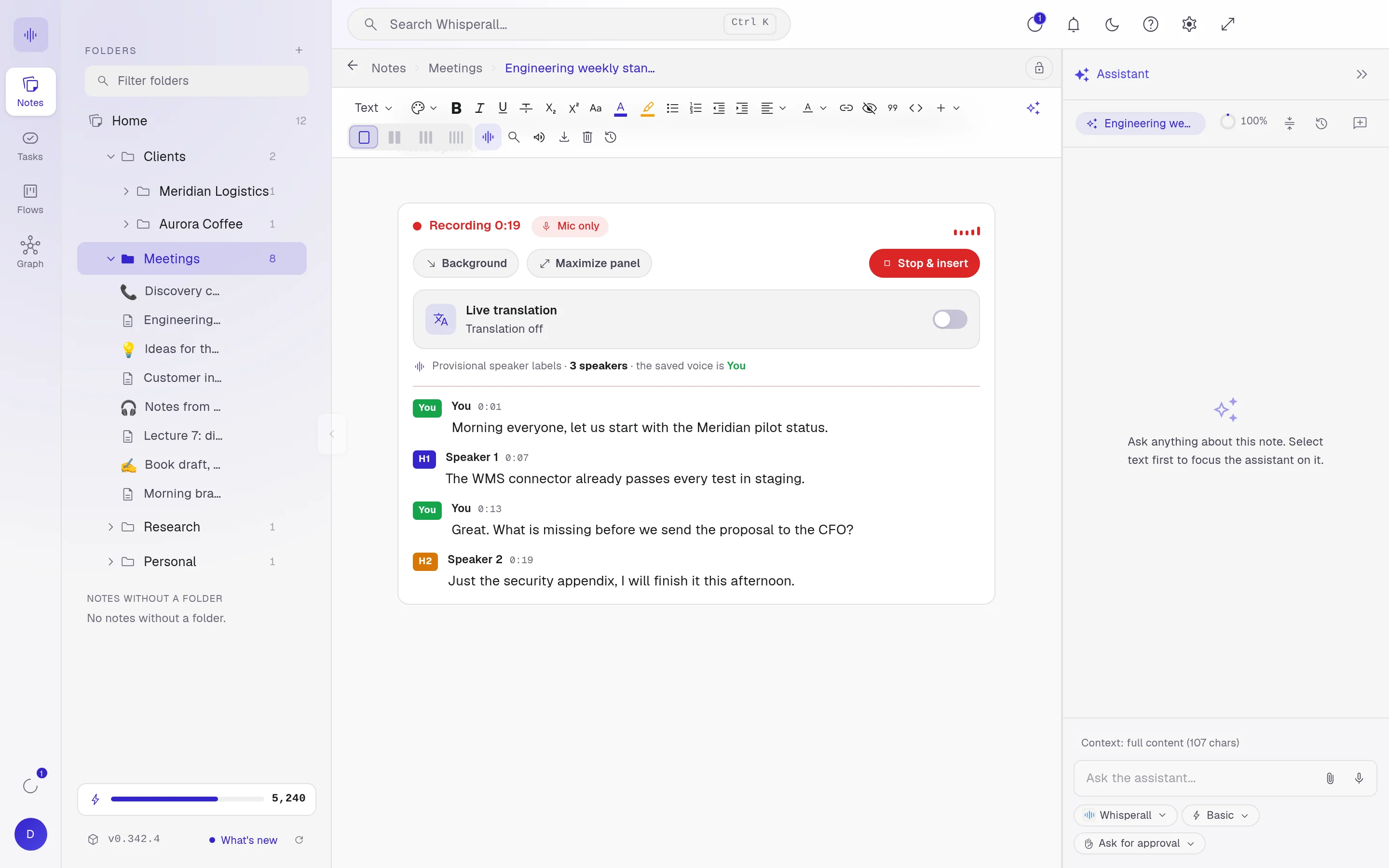
The lecture turns into text while you listen
The transcript lands in your note live, with every voice separated. If the lecture is in another language, turn on translation and each turn appears translated next to the original.
Add the professor’s PDF to the same note and keep the lecture and the material together.

From notes to essay
Dictate the first draft instead of staring at a blank page, and autocomplete helps you finish each sentence. Tab to accept.
- Dictate in Word, Google Docs or your notes, with no minute cap
- Translate a paragraph with Alt+T, in 12 languages
- Teacher mode reviews your text, corrects it and explains why
- Export your notes to Word or PDF
How students use it
A few concrete ideas for this term.
- Transcribe a week of recorded lectures in one go
- Dictate an essay draft and polish it with AI
- Translate a paragraph from a reading before you cite it
- Keep every course in its own folder of notes
- Search all your lectures for the point you missed
- Ask your AI about what you missed in class, right inside your own notes
Frequently asked questions
Whisperall installs on your computer. If you record on your phone, move the audio to your computer and upload it: it takes mp3, m4a, wav and other formats, up to 10 hours. Android and iOS apps are on the way.
It depends on your school and where you live. Whisperall doesn’t notify anyone when you record, so ask first if it’s allowed.
Yes, when you ask. Ask the assistant what the lecture covered: it reads the whole transcript and walks you through it topic by topic, even a two-hour lecture. You can also select one topic and ask for a summary or an explanation.
The free plan gives you 150 credits once to try the AI. The $9 Starter plan includes 2,000 a month, about 3.7 hours of online classes or close to twice that in person, because it records one audio channel. If you run out of credits, your notes stay right there.
Recordings you upload are transcribed in English, Spanish, Portuguese, French, German, Italian, Japanese, Korean or Chinese. In a live lecture you can also see the translation next to the original, in 34 languages.
Simple enough for anyone. Powerful enough for you.
Download Whisperall free and keep your notebook forever. AI is paid with credits, only when you use it.
Windows · macOS · Linux · Android and iOS on the way

 Your AI work notebook