For sales
Log the call, move the deal and keep selling
Record the call with your customer and the transcript lands in your note with every voice separated. When you hang up, ask for the follow-up and move the lead to its next stage in one tap, with its notes and tasks attached.
Free to start · No card · Windows, macOS and Linux

How it works
Record the call
If the call plays on your computer, in Zoom, Meet, Teams or another app, Whisperall records its audio and your microphone, with every voice separated.
Pull the follow-up
When you hang up, ask for a summary with next steps and the assistant turns them into tasks with dates. It proposes and you approve.
Move the lead
The lead moves through the stages of your sales flow, with the call note and its tasks attached.
What slows a rep down
Selling is talking to people. Logging what was said is what always gets pushed to later.
- You take notes while you talk and lose the thread of the deal
- The best detail from the call is gone before you log it
- Deals sit in the wrong stage because updating them by hand is one step too many
- The next action lives in your memory instead of on the card
Write the follow-up by talking
Dictate the email or the message to your customer and clean text appears at your cursor. If your customer speaks another language, Whisperall translates what you dictate before pasting it, in 12 languages.
Your sales flow, ready to use
The Sales flow comes with stages like contacted, proposal and won. Each lead carries its notes, its tasks and the deal value, and you move it in one tap or ask the assistant to do it.
- Deal value in 11 currencies, including US and Canadian dollars, euros and pounds, with daily exchange rates
- Board, records, agenda and metrics views
- Import and export your leads as CSV, including Odoo’s format

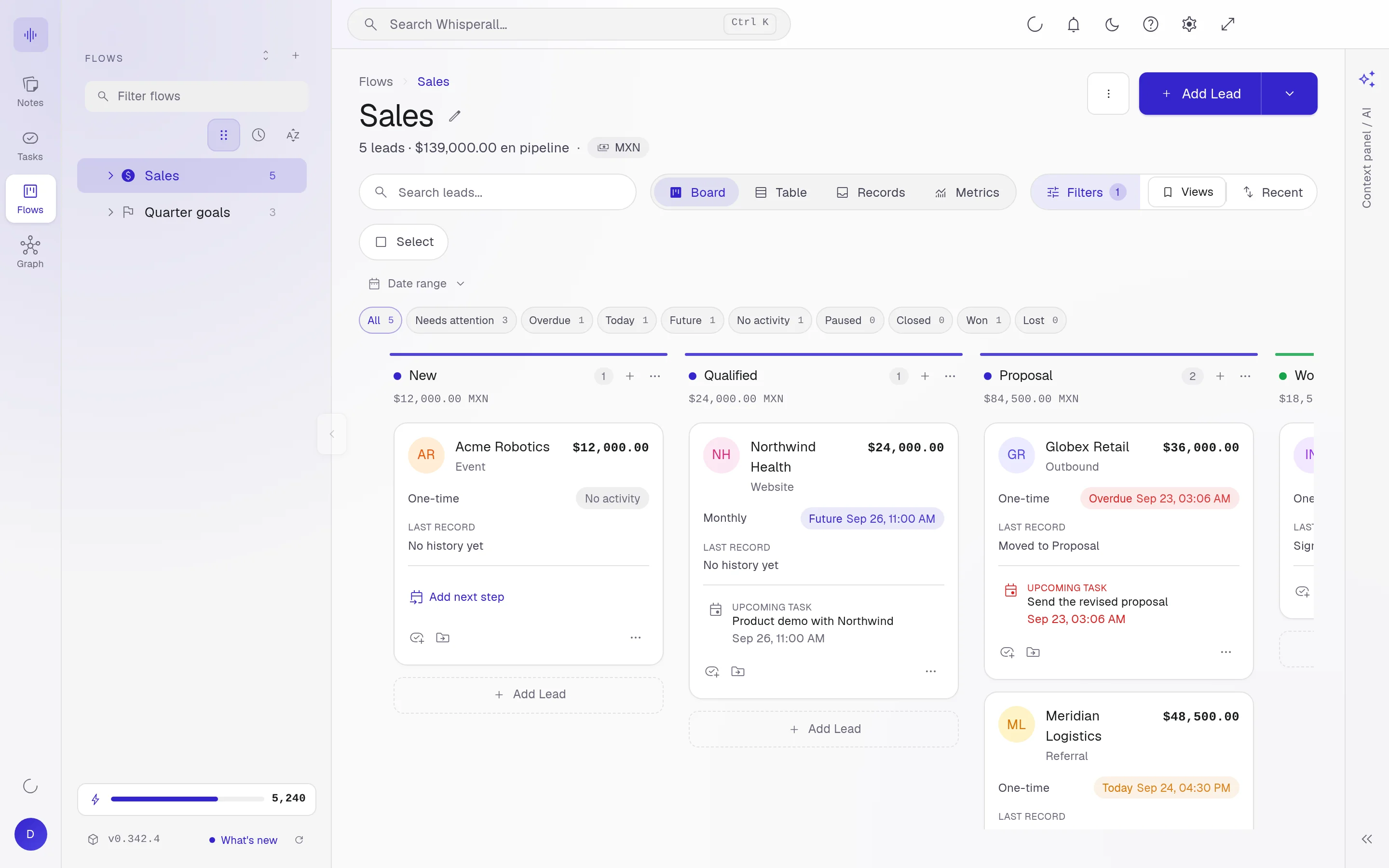
Every call, at hand
The transcript becomes a note you link to the lead. Weeks later, search for the exact objection a buyer raised with Ctrl+K, or ask the assistant what was agreed.
How reps use it
A few concrete ideas for your next call.
- Transcribe a discovery call and link it to the lead
- Move a deal through stages as the conversation progresses
- Turn a call into follow-up tasks
- Dictate a recap for the customer right after you hang up
- Transcribe the voice messages customers send you
- Search back for the exact objection a buyer raised
- Ask your AI for the follow-up email inside the call note and adjust it before you send it
Frequently asked questions
Whisperall installs on your computer and records what plays on it. It can’t record a cell phone call directly, but if you have the recording, upload it and it’s transcribed with every voice separated. Android and iOS apps are on the way.
Yes, when the law or your company’s rules require it. Whisperall doesn’t add a bot to the call, so nobody gets an automatic notice and telling them is up to you.
It doesn’t connect directly to other CRMs. You can import and export your leads as CSV, including Odoo’s format, and run the whole follow-up in the Sales flow.
The $9 Starter plan includes 2,000 credits a month, about 3.7 hours of calls on your computer, and the $29 Pro plan includes 7,500, about 14 hours. The free plan gives you 150 credits once to try it.
It does nothing without your permission. Ask it, for example, to move a lead to proposal and create the follow-up task, and it shows you the changes to approve.
Simple enough for anyone. Powerful enough for you.
Download Whisperall free and keep your notebook forever. AI is paid with credits, only when you use it.
Windows · macOS · Linux · Android and iOS on the way

 Your AI work notebook