Granola alternative
Meeting notes like Granola, on Windows, Mac and Linux
Like Granola, Whisperall works without a bot in the call. It records from your computer, runs on Linux too and keeps your notes with no time limit. It also adds dictation in any app, file transcription and live translation into 34 languages.
Free to start · No card · Windows, macOS and Linux

How it works
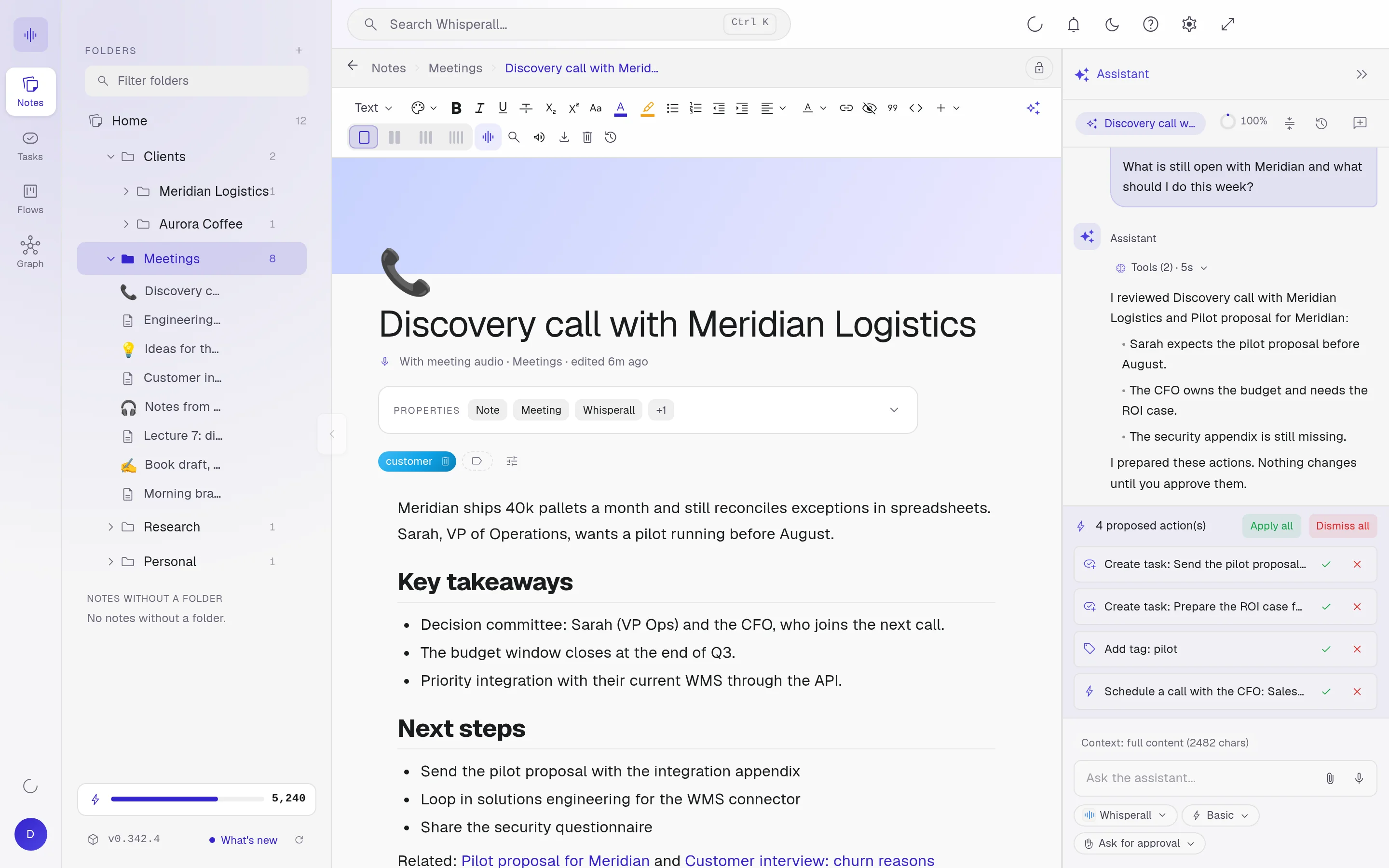
Install it
On Windows, macOS with Apple Silicon or Linux. Free to start, no card needed.
Record the call
Pick Virtual for a video call or In person for a room. Each speaker shows up separated as they talk.
Leave with next steps
Ask for a summary with next steps, and the assistant turns them into tasks you approve.
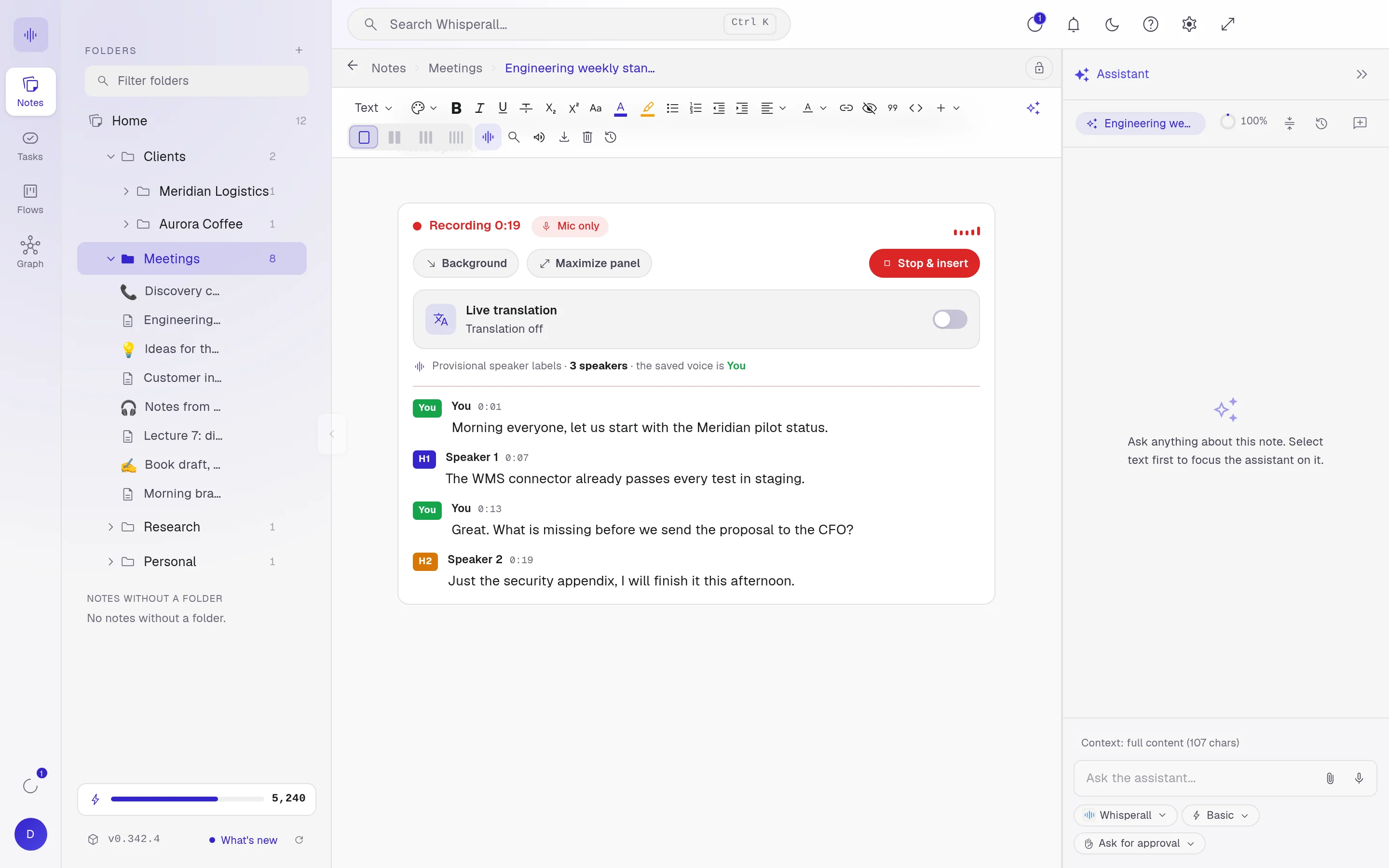
Speakers separated as they talk
Whisperall tells voices apart in real time, even when people share a microphone, and marks the minute each turn starts. You give the speakers names, and the transcript stays in your note, ready to edit.
Linux included
Granola has no Linux app. Whisperall runs on Windows, macOS with Apple Silicon and Linux, and on Linux it records calls through PulseAudio or PipeWire.
Your notes don’t expire
Granola’s free plan keeps 30 days of history. In Whisperall the notebook is free forever: notes, tasks, flows and the graph. AI features use credits, and you get 150 to start.
More than meeting notes
Dictate in any app with Alt+X, transcribe recordings of up to 10 hours in batches of up to 500 files, and keep it all next to your tasks and flows.
Translate the meeting as it happens
Turn on live translation and each turn appears next to the original, in the language you pick from 34. To reply, dictate in your language and Whisperall writes it in theirs.
Granola and Whisperall, side by side
Both record meetings without a bot. They differ in where they run and in what the free plan keeps.
| Granola | Whisperall | |
|---|---|---|
| Bot in the call | No | No |
| Computers | macOS and Windows | Windows, macOS with Apple Silicon and Linux |
| Phones | iOS and Android | Android and iOS on the way |
| Free plan | Keeps 30 days of history | Notes don’t expire, 150 credits to start |
| Paid plans | Business $14, Enterprise $35 | From $9 a month |
Checked on September 24, 2026 on Granola’s website and help center. List prices may change.
Frequently asked questions
Granola doesn’t have a Linux app. Whisperall does: it records calls through PulseAudio or PipeWire, with no bot, and keeps the transcript in your notes.
Yes, Granola has apps for macOS and Windows. If you also use Linux, or want dictation and file transcription in the same app, Whisperall runs on all three.
No. Like Granola, it works without a bot. It records your computer’s audio and your microphone, so nobody new joins the call. On a Mac you need macOS 15 or later for the call’s audio.
When you ask. At the end of the meeting, request a summary with next steps, and the assistant can turn them into tasks or flow cards for you to approve. It isn’t automatic.
The notebook is free forever, and AI uses credits. The free plan brings 150 credits once, and the $9 Starter plan 2,000 a month, about 3.7 hours of video calls or about twice that in person.
Simple enough for anyone. Powerful enough for you.
Download Whisperall free and keep your notebook forever. AI is paid with credits, only when you use it.
Windows · macOS · Linux · Android and iOS on the way

 Your AI work notebook